DeepSeek OpenDesign

Design With
DeepSeek in
OpenDesign.

How to design interfaces with the DeepSeek TUI in OpenDesign: your own API key, a 1M-token context for large design systems, one API-usage page from brief to reviewed file, and the limits to know before you start.

On This Page Example
  1. Example
  2. Fit
  3. Compatibility
  4. Setup
  5. Workflow
  6. Resources
  7. Limitations
  8. FAQ

One Complete DeepSeek Design Task

From Brief to Interface: A DeepSeek Design Task

One task, traced from handoff to final check: the brief and constraints you provide, the artifact DeepSeek TUI returns, and the review you still owe before calling it finished. The interface below is an illustrative example made for this page, not a captured DeepSeek session.

1Design Brief and Constraints

Brief

Design an API console usage page: tokens used, cost, error rate, rate-limit headroom, a daily chart and top endpoints. Cover desktop and phone.

  • Design systemOpenDesign paper canvas with Albert Sans and one green accent
  • Breakpoints1440px desktop and 390px mobile, with no horizontal scroll
  • InteractionsProject switcher, period toggle and endpoint sort
  • OutputA single self-contained HTML file with stable data-od-id hooks

2Who Does What: You, DeepSeek TUI and OpenDesign

  • You

    You write the brief, choose the design system and set the acceptance criteria.

  • DeepSeek

    DeepSeek TUI plans the layout, writes HTML, CSS and JavaScript, then revises on request.

  • OpenDesign

    OpenDesign supplies the design system and skill, renders the preview and keeps each version as a file in the project.

  • Review

    Before handoff, check visual hierarchy, 8px grid spacing, both breakpoints and every interaction.
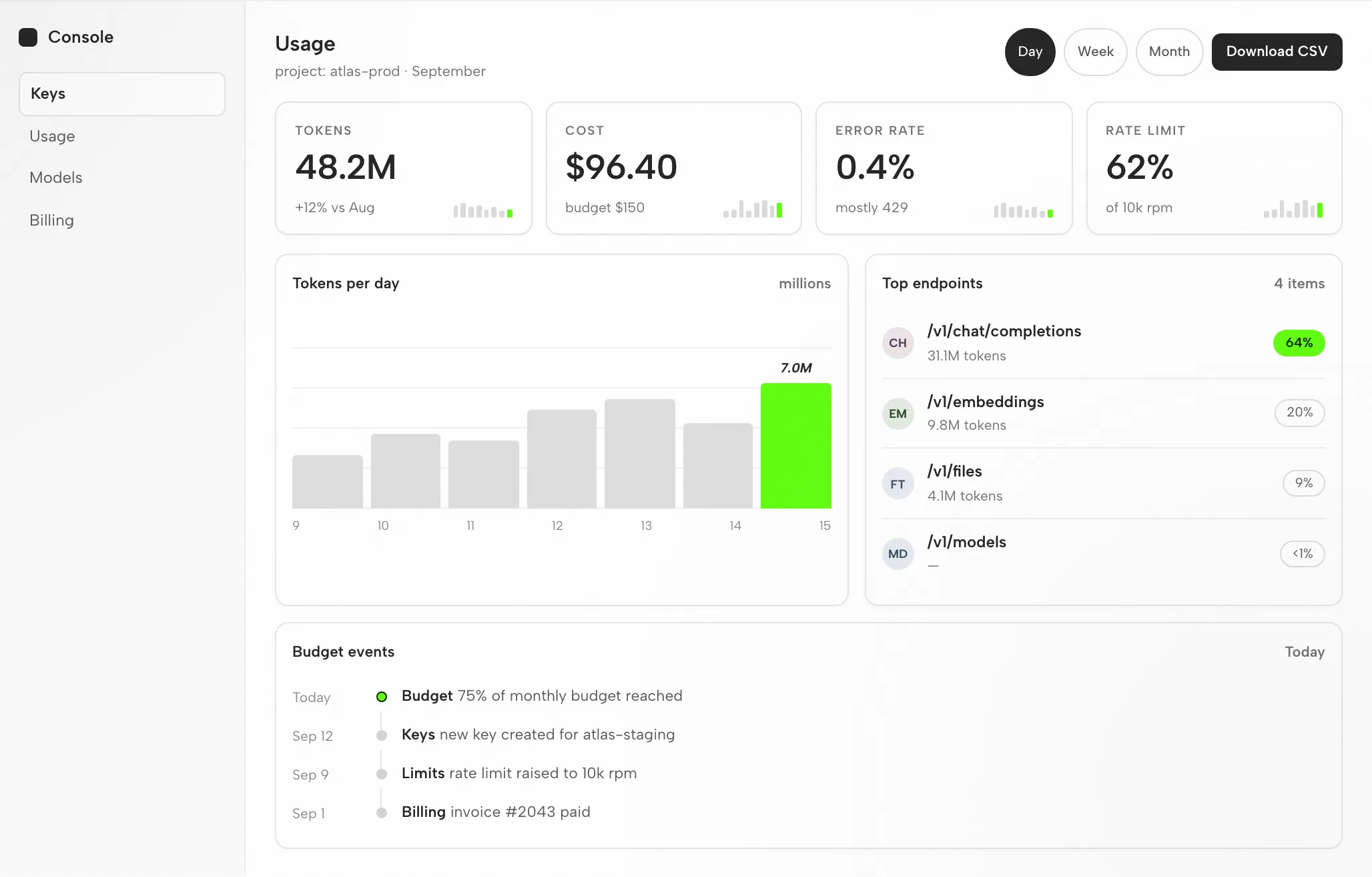
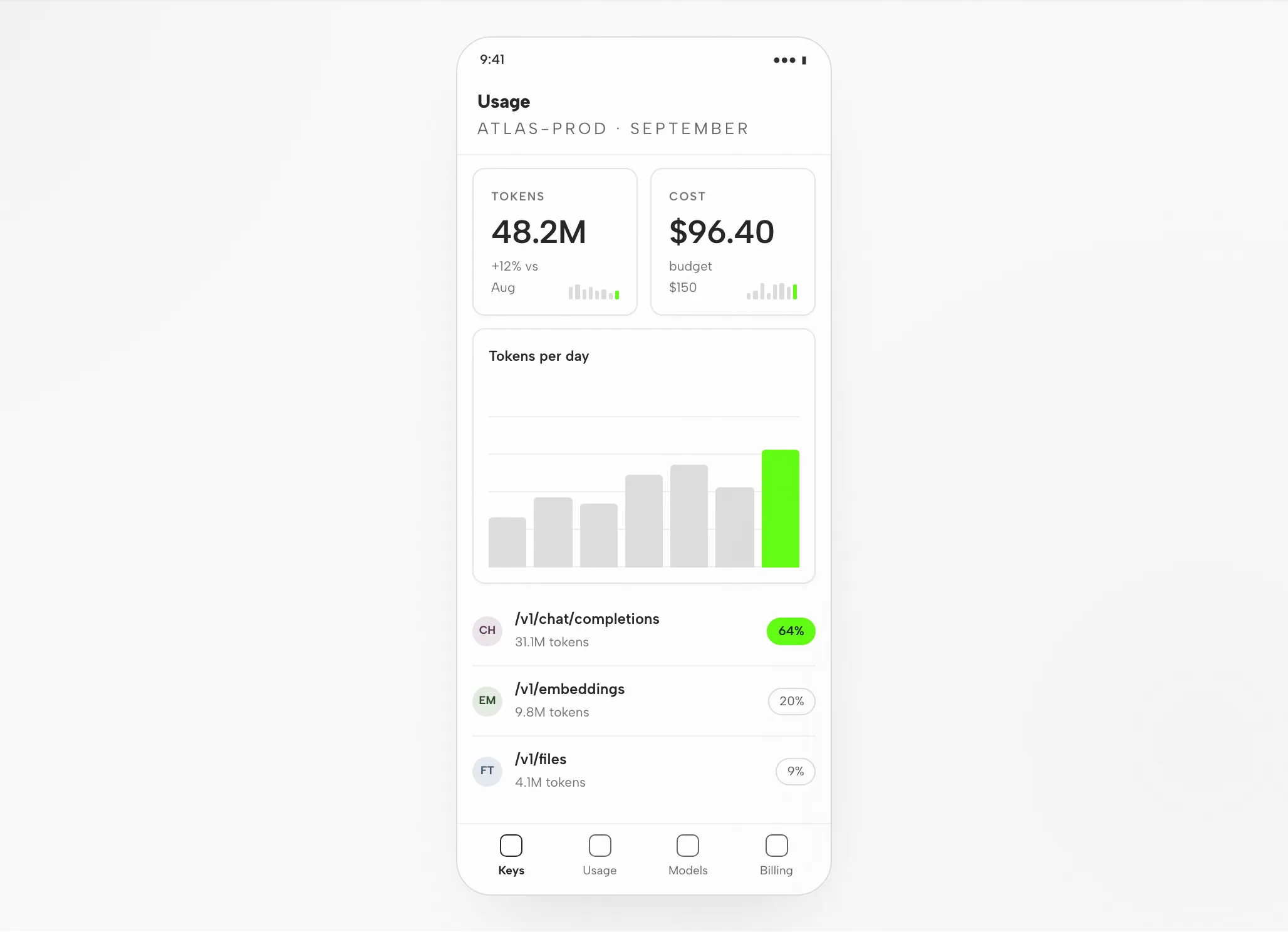
3DeepSeek Artifact: Usage Dashboard at 1440px and 390px

DeepSeek Artifact: Usage Dashboard at 1440px and 390px — Desktop
Illustrative example

4Review Before Handoff

Layout

Grid and Spacing

Cards, chart and endpoint table sit on the 8px grid; long endpoint paths truncate rather than wrap.

Hierarchy

Visual Hierarchy

Tokens and cost lead the reading order; the accent marks today’s bar and the top endpoint share.

Responsive

Mobile Layout

Two cards per row, chart underneath, endpoints listed with their share on the right.

Interaction

Interaction Checks

Open the CSV action, switch the period, sort endpoints.

Fit

Where DeepSeek Fits, and Where It Does Not

DeepSeek Fits When

  • Strong, cheap coding. Capable coding models at very low per-token cost turn a described layout into responsive markup, so iteration stays inexpensive.
  • 1M-token context. A full design system, component library and reference set fit together, letting output reuse your real primitives — and context caching keeps repeated prompts cheaper.
  • Context file + MCP. Your conventions live in a context file; the Figma MCP server feeds real design context into code through DeepSeek’s tool calling.
  • Open weights, BYOK. DeepSeek ships open weights, and you supply your own DeepSeek API key — text-only, so check visuals in a real browser.

Choose Another Workflow When

  • You need editable vector files. The result is HTML, not an editable design document. Look to a separate vector workflow for the asset format you require.
  • You have no reference and no constraints. Without a design system or examples, output drifts toward a generic look; write the brief first.
  • You do not have the credential this agent needs. Required: DeepSeek API key (bring your own key). OpenDesign neither provides nor proxies credentials.
  • Your team works in DeepSeek Harness or Reasonix. Those agents have their own pages; setup differs by agent. See related agents.

Compatibility

DeepSeek Requirements Before You Start

Scope: DeepSeek as connected through the OpenDesign desktop app. Published references checked on 6 September 2026.

Tool ScopeDeepSeek, by DeepSeek

DeepSeek TUI is a terminal AI coding agent powered by DeepSeek’s models; it reads your codebase, edits files, runs commands, manages git and searches the web. DeepSeek is the model provider, offering an OpenAI-compatible API (plus an Anthropic-format endpoint). This page concerns designing interfaces with DeepSeek through OpenDesign, not DeepSeek’s own interface. OpenDesign’s setup notes list the available agents.

Accounts and AuthenticationDeepSeek API key (BYOK)

DeepSeek API key (BYOK). Sign in with your own DeepSeek API key (BYOK); credentials remain on your machine. No quota or price is promised on this page.

System and VersionsDesktop app or source

Look to the download page for desktop builds. Node.js and pnpm requirements in the source quickstart apply only when running from source, not when installing a desktop package. Minimum compatible DeepSeek version: not verified here.

Connection CheckThe success signal

Use the connection instructions your installed version displays, then try a small task. Check that DeepSeek handled it and that the artifact opens. Downloading alone is not proof of a working connection.

Start with the desktop app

DeepSeek Setup in Three Steps

Download first, finish the DeepSeek setup for your installed version, then verify a small result. Following this path does not require building OpenDesign from source.

  1. 1

    Download the OpenDesign Desktop App

    Pick the package for your computer, install it and launch the app.

    Download OpenDesign
    CHECKPOINT
    The desktop app opens. If it is already installed, go to the next step; no need to download again.
  2. 2

    Prepare Your DeepSeek Connection

    Follow the DeepSeek instructions that ship with your installed version. Authenticate with your own DeepSeek API key (BYOK); credentials stay on your machine.

    DeepSeek API documentation
    # 1. Get a DeepSeek API key from the DeepSeek platform
    #    https://platform.deepseek.com
    export DEEPSEEK_API_KEY=sk-...
    
    # 2. Install a DeepSeek-capable terminal agent (follow its README),
    #    then point it at DeepSeek. The API is OpenAI-compatible:
    #      base URL: https://api.deepseek.com
    #      model:    deepseek-v4-flash (or deepseek-v4-pro)
    #    (an Anthropic-format endpoint also exists at /anthropic)

    Source: the DeepSeek setup notes in the published guide; verify the current command in the vendor documentation.

    CHECKPOINT
    Confirm the agent and account you intend to use. If either is unavailable, check compatibility before attempting a larger task.
  3. 3

    Run One Small DeepSeek Task

    Start with a modest brief so you can gauge the entire loop, including one revision.

    Starter brief

    Build a settings screen with a profile form and a save confirmation. Apply my design rules. Check it at desktop and mobile widths.

    CHECKPOINT
    Open the result, test the save state and ask for one specific change. Generation opens review; it does not close it.

If you want to run OpenDesign from source, use the technical quickstart instead.

The DeepSeek design workflow

How a DeepSeek TUI Design Task Moves Through Five Steps

Follow one API usage dashboard from brief to reviewed HTML. Every stage names your input, DeepSeek TUI's move, OpenDesign's contribution and the check the file still needs.

  1. 1

    Design Brief

    Keep it plain: three to six lines. Say who reads the screen, what job it performs and which platforms matter.

    • YouWrite the brief; if you have a reference screenshot, include it.
    • DeepSeekReads the brief and the repo's context file; asks a question when a term is ambiguous.
    • OpenDesignProvides the project, the TUI prompt surface and the skill matched to the artifact type.
    • CheckMake sure the brief carries acceptance criteria. Settling them before generation costs less than a rework pass.
  2. 2

    Design Constraints

    A design system plus a few firm rules. That is what keeps output tied to your brand instead of a default library look.

    • YouChoose the design system, name the breakpoints and flag any components the agent must reuse.
    • DeepSeekPulls your DESIGN.md tokens and posture rules into context before it writes anything.
    • OpenDesignShips the design-system library and binds your selected system into the skill template.
    • CheckCheck that tokens match the brand: one accent, the intended fonts, the correct radius.
  3. 3

    Generate the Interface

    Now DeepSeek TUI writes a self-contained HTML file: layout, styles, interactions and stable element hooks.

    • YouWait, or answer one clarifying question. There is no setting to adjust.
    • DeepSeekPlans the sections, writes the HTML, CSS and JavaScript, then runs the file and repairs whatever fails.
    • OpenDesignSaves the artifact into the project folder and indexes it so the preview can find it.
    • CheckHold off. Read the rendered file, not the source, before you judge it.
  4. 4

    Preview

    The artifact renders inside OpenDesign at the widths you specified. This is the moment design quality is tested.

    • YouChange widths, exercise the interactions, and pin comments to specific elements.
    • DeepSeekReads your preview comments and prepares the next revision.
    • OpenDesignRenders the preview and exposes data-od-id targets for comments and edits.
    • CheckCheck hierarchy, contrast, overflow at 390px, focus states, and whether the accent stays restrained.
  5. 5

    Revise and Verify

    Ask for changes by pointing at elements in the preview. Each revision becomes a new file; no silent overwrite.

    • YouTurn comments into change requests and decide when the task is done.
    • DeepSeekApplies the requested changes and re-runs the file.
    • OpenDesignKeeps versions side by side and exports an image or the HTML when you finish.
    • CheckRe-check the changed area only, then the full page once at each breakpoint.

Resources

DeepSeek Design Resources

Limitations

DeepSeek Limits, Checks You Run by Hand, and Fallbacks

  • ScopeThis page treats DeepSeek as an agent connected to OpenDesign; it does not cover every DeepSeek feature.
  • Usage LimitsUsage limits and cost follow the credential you bring (DeepSeek API key). No free-quota claim is made here.
  • NetworkLocal project files are not offline inference. Check your agent's provider settings and data policies before you share sensitive inputs.
  • Output Is HTMLArtifacts are HTML files; they are not vector design files.
  • Manual ReviewYou review accessibility, real content, brand fit and interaction correctness in the preview. Treat any agent self-check as a first pass.
  • FallbackIf the agent is unavailable or a task fails, check the installed version's connection instructions and authentication. Save the error and the last working artifact before you change configuration.

FAQ

Common Questions About DeepSeek and OpenDesign

Can DeepSeek TUI Really Do Design Work?
Yes — with an aesthetic skill, a design system, and concrete references in context, a DeepSeek-powered terminal agent produces production-quality, responsive UI, and you verify the output in a real browser. DeepSeek’s models are text-only, so the verification loop replaces native image reading. Without that context it tends to default to a generic look, which is the gap OpenDesign fills.
How Much Does It Cost to Design With DeepSeek TUI?
Little — DeepSeek’s API is among the cheapest per token, and prefix context-caching cuts the cost of repeated prompts further, so you can iterate aggressively. You bring your own DeepSeek API key (BYOK); OpenDesign never proxies your credentials.
What Gives DeepSeek Its Design Edge?
Strong, cost-efficient coding models, open weights, and a 1M-token context that holds an entire design system and reference set at once. DeepSeek is text-only — it does not read images natively — so taste still comes from the design system, skill, and described references you supply, verified in a browser.
DeepSeek TUI or Claude Code for Frontend Design?
Both are strong. Claude Code is known for specific, codebase-aware design decisions; DeepSeek TUI’s edge is open weights, very low cost, and a huge context for high-volume iteration. Many teams use both — OpenDesign lets you switch agents without changing your design workflow.
How Do I Connect DeepSeek TUI to Figma?
Add the Figma MCP server in your terminal agent’s MCP configuration. The agent can then pull real design context — components, variables, layout data — so the generated code matches the source instead of approximating it. DeepSeek’s API supports the tool calling MCP relies on.
What DeepSeek TUI actually is
A DeepSeek TUI is a keyboard-driven terminal AI agent that runs DeepSeek’s models. It reads your repository, edits files, runs shell commands, manages git, and can search the web — planning and verifying work from natural-language tasks rather than just completing lines. DeepSeek itself is the model provider: an OpenAI-compatible API (it also exposes an Anthropic-format endpoint), so a wide range of community terminal agents can be pointed at DeepSeek by setting a base URL and key. Several open-source TUIs ship DeepSeek as a first-class provider.

For design work, three properties stand out. DeepSeek’s coding models are strong, so the agent reasons about layout, structure, and component hierarchy from a clear description. Its context window reaches up to 1M tokens, large enough to hold your whole design system and component library at once. And its pricing is very low per token, with prefix context-caching on top — so iterating on a design costs little.

Context files: Terminal agents read a project context file (an AGENTS.md-style file, or the agent’s own convention) for persistent rules — the natural place to encode your design conventions, tokens, and review checklists.

Tools + MCP: Most DeepSeek TUIs ship file, shell, git, and web tools, and support MCP servers to add external context like a live Figma file — DeepSeek’s API supports tool calling, which these agents rely on.

Bring your own key: You authenticate with a DeepSeek API key from the DeepSeek platform. Because the API is OpenAI-compatible, pointing an agent at DeepSeek is usually two lines: base URL and key.

Credential: DeepSeek API key (BYOK) from the DeepSeek platform

Models: deepseek-v4-flash and deepseek-v4-pro (text-only; no native image input)

Vendor: DeepSeek (model and API provider)
Why strong coding models and a huge context fit design
DeepSeek TUI’s design edge comes from the model and its economics — but, as with every agent, taste still has to be supplied.

Strong, cost-efficient coding: DeepSeek’s coding models are capable and inexpensive, so the agent reasons well about layout and structure and you can iterate many times without cost being the constraint.

A 1M-token context window: A large context means the whole design system, tokens, and many reference states fit at once, so the agent reuses your real primitives rather than inventing one-off styles — and context caching keeps repeated prompts cheap.

Conventions in a context file: A project context file (plus the Figma MCP server) points the agent at your tokens, components, and real specs, so it works against a brand instead of a default look.

Taste comes from three inputs you provide: a design system, a skill, and real references.

The lesson is the same one every agent teaches: DeepSeek TUI does not have taste by default. It produces good design when you give it constraints — a design system, an aesthetic skill, and concrete references. OpenDesign packages exactly those inputs, which is why the two fit together (more below).
Set up DeepSeek TUI for design work, from zero
Here is the full path from a clean machine to a DeepSeek TUI that can build and verify UI. Exact install and command names vary by which terminal agent you pick, so the steps below stay at the level that holds across them.

The setup sequence: get a key → point the agent at DeepSeek → configure a context file → add a skill → enable browser verification.

Encode your design rules: Put your tokens, primitives, and conventions in the agent’s context file and point it at them, so output matches a brand instead of defaulting to a generic look.

Add browser verification: Wire a Playwright or browser MCP so the agent renders in a real browser and checks its output across breakpoints instead of only confirming the build passes.

Use the current setup section for commands and version-specific details, which may change.

# 1. Get a DeepSeek API key from the DeepSeek platform # https://platform.deepseek.com export DEEPSEEK_API_KEY=sk-... # 2. Install a DeepSeek-capable terminal agent (follow its README), # then point it at DeepSeek. The API is OpenAI-compatible: # base URL: https://api.deepseek.com # model: deepseek-v4-flash (or deepseek-v4-pro) # (an Anthropic-format endpoint also exists at /anthropic) # 3. Start it in your project and generate project context cd your-project # create/scaffold a project context file with your design rules # 4. Wire the Figma MCP server (optional, for design handoff) # add it to the agent's MCP server configuration
Historical command example from the previous guide; verify current syntax in the linked vendor documentation.
Turning References Into UI
DeepSeek’s models are text-only — they do not read images natively — so the highest-leverage design loop is turning clear references and described layouts into working, responsive UI, then verifying the result in a real browser rather than asking the model to look at a screenshot.

Start from the clearest references you have — and describe multiple states (desktop and mobile, hover, empty, loading), not just one hero shot.

Be specific in the prompt; vague prompts produce generic UI even with a strong model. Spell out spacing, hierarchy, and the components to reuse.

Keep your design system and conventions in the context file, and tell the agent where the tokens and canonical primitives live.

Run a dev server and have the agent render in a real browser, resizing to breakpoints to check the result — this is where verification happens, since the model cannot see the image itself.

Iterate by having the agent compare the rendered DOM and computed styles back to your described spec — not merely confirm it builds.

Describe the target precisely and give concrete constraints:

Keep prompts small and focused, commit good iterations and revert bad ones (telling the agent when you revert), so each pass builds on a clean base.

# in the agent's prompt: > Implement this design in React + Vite + Tailwind + TypeScript. Layout: two-column dashboard, 240px sidebar, 24px gutters, card grid at 3/2/1 columns for desktop/tablet/mobile. Reuse my existing design-system components and tokens from the context file. Match spacing, layout, and hierarchy; make it responsive. Run the dev server, render it in the browser, and iterate against the spec across breakpoints until it matches.
Historical command example from the previous guide; verify current syntax in the linked vendor documentation.
Context files, MCP, and tools
Three extension points make a DeepSeek TUI practical for sustained design work, and all three map cleanly onto an open design workflow.

Project context file: Project rules live in a context file at the repo root (with global and team layers). It is the durable home for your design conventions, read on every run.

MCP servers: Configure MCP servers in the agent — the portable way to bring in design context and external tools, most relevantly the Figma MCP server, that work across agents, not just one. DeepSeek’s API supports the tool calling these servers rely on.

Built-in tools: DeepSeek TUIs ship file, shell, git, and web tools so the agent can gather references and run the verification loop without leaving the terminal.

These are portable, multi-agent capabilities — exactly the kind of thing OpenDesign is built to orchestrate, rather than re-create per project.
DeepSeek TUI vs Codex vs Claude Code vs Cursor vs Gemini CLI for design
There is no single winner for design work — each agent has a different strength, and experienced teams stack them. A fair summary:

DeepSeek TUI — Strong, very cost-efficient coding models with open weights and a 1M-token context; text-only (no native vision) — High-volume iteration on a budget and holding a whole design system in context

Codex — Strong visual polish with a frontend skill; sandboxed async builds — Delegated async builds and portable AGENTS.md rules

Claude Code — Specific design decisions (hex, spacing, type) and codebase-aware UX — Frontend reasoning and large-context refactors

Cursor — Visual build-and-see loop with live preview and inline edits — Tight iterate-and-watch UI work inside an IDE

Gemini CLI — Native multimodal image understanding and a 1M-token context; open-source with a free tier — Screenshot-heavy work where the agent reads references directly

The recurring community verdict is that taste comes from humans: all of them default to a generic aesthetic without skills, references, and constraints. That is the real problem to solve — and it is design-tool-shaped, not model-shaped.

Agent — Design strength — Best for
Common Pitfalls and the “AI slop” Look
The most common complaint about AI-generated design is that it looks generic — soft gradients, floating panels, oversized rounded corners, dramatic shadows, an Inter-and-purple vibe that “screams an AI made this.” Other reported issues include broken mobile layouts and instructions leaking into UI copy. None of these are unique to DeepSeek TUI; they are what happens when any agent runs without a curated design context. Because DeepSeek is text-only, it is especially important to verify in a real browser rather than trusting the model to “look” at the result.

Add an aesthetic skill: A curated design skill forces the agent to commit to a real direction instead of the default look.

Verify in a real browser: Render and self-check across breakpoints with a browser tool — essential here, since the model cannot read a screenshot itself — so layouts do not silently break on mobile.

Supply tokens and references: Real design tokens and concrete, described references are the single biggest lever on output quality.

Encode rules in the context file: Put “no hero cards, max two typefaces, brand-first hierarchy” style rules where the agent reads them every run.

Notice that every mitigation is about giving the agent a curated design context. Maintaining that context by hand, per project, is the toil OpenDesign removes.
Designing with DeepSeek TUI inside OpenDesign
OpenDesign is the open-source design layer the workflow above keeps asking for. It treats the DeepSeek agent as a first-party adapter and wraps it in a curated skill and design-system library, a structured render pipeline, and a local desktop UI — so the design context that makes DeepSeek good is there from the first run, not assembled by hand each time. Both are open and local-first, which makes the pairing a natural fit.

Install OpenDesign and select the DeepSeek TUI as your agent.

Authenticate with your own DeepSeek API key (BYOK) — credentials stay on your machine and are never proxied through us.

Pick a design system and a skill, then generate decks, prototypes, and landing pages with consistent taste.

Every artifact and DESIGN.md file lives in your own repo, not a hosted cloud.

Same DeepSeek agent, same key — plus a real, portable, open-source design workflow around it. It is local-first and Apache-2.0, so nothing about your work or your credentials leaves your machine.
OpenDesign and DeepSeek: Any Affiliation?
No. OpenDesign is independent; DeepSeek is a trademark of DeepSeek.