FURTHER READING
Further Reading for Antigravity
Tutorials, documentation and walkthroughs for Antigravity design work, as itemized in the published guide.


 Antigravity
  OpenDesign
 How to design interfaces with Antigravity in OpenDesign: screenshots as the input, the integrated browser checking every pass, one signup-flow task from brief to reviewed file, and the limits to know before you start.
THREE ROUTES INTO THIS ANTIGRAVITY GUIDE
This walkthrough covers the brief, references, design rules and a reviewed HTML artifact.
Read this guide SETUPThe complete route from a clean install to an Antigravity agent that builds and verifies UI.
Go to setup COMPARISONHow Antigravity compares with Codex, Claude Code and Cursor for design work, and when another workflow is the better choice.
See the comparisonOne Complete Antigravity Design Task
One task traced from handoff to finished check: the brief and constraints you give Antigravity, the artifact it returns, and the review you still owe before calling it done. The interface below is an illustrative example made for this page, not a recorded Antigravity run.
BriefDesign a team product signup in three steps: account, workspace, invite teammates. Before handoff, verify each step in the integrated browser at desktop and phone widths.
data-od-id hooksYou write the brief, choose the design system, and set the acceptance criteria.
Antigravity plans the layout, writes the HTML, CSS and JavaScript, then revises on request.
OpenDesign supplies the design system and skill, renders the preview, and keeps each version as a project file.
Before handoff, visual hierarchy, spacing on the 8px grid, both breakpoints, and every interaction get checked.
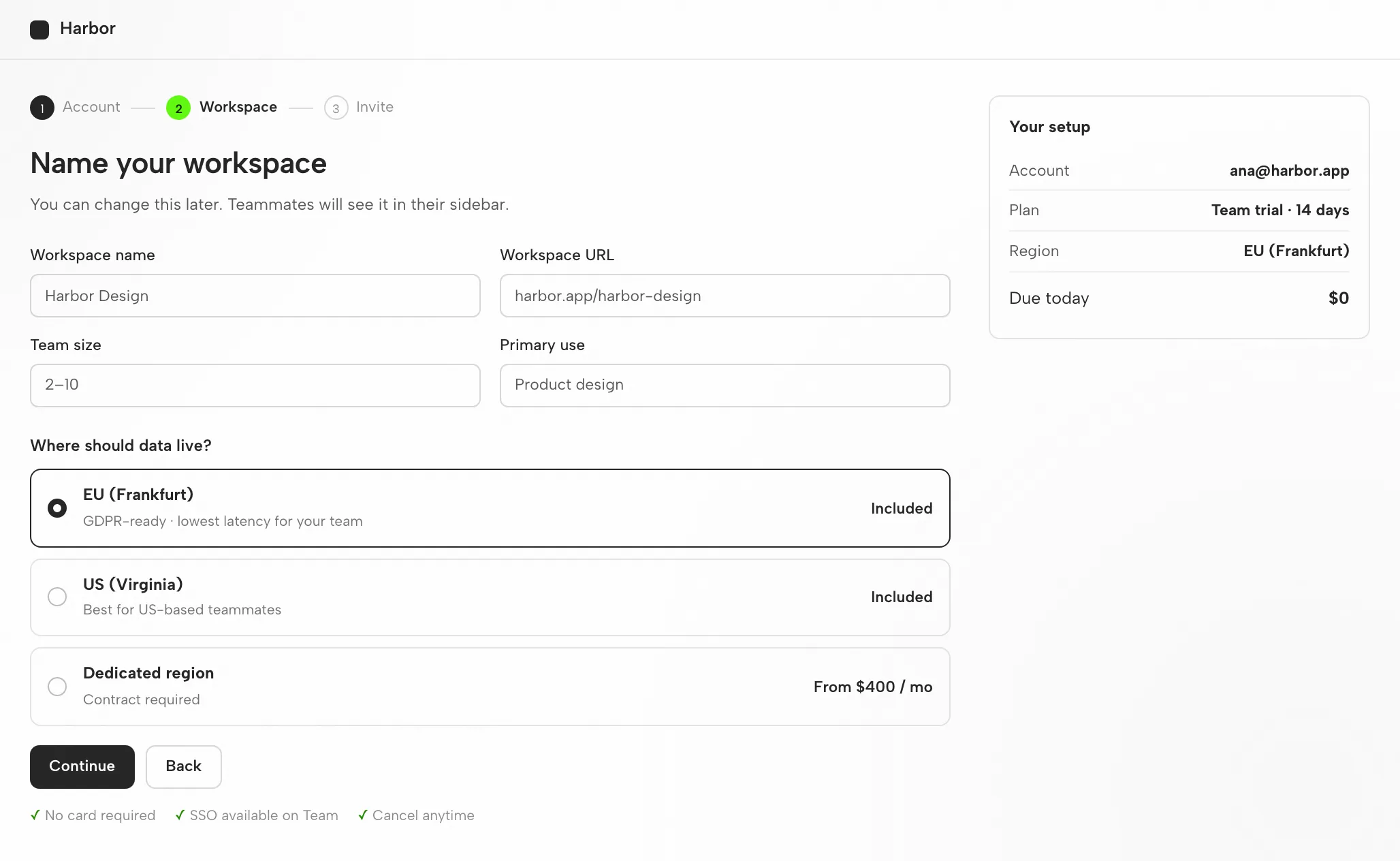
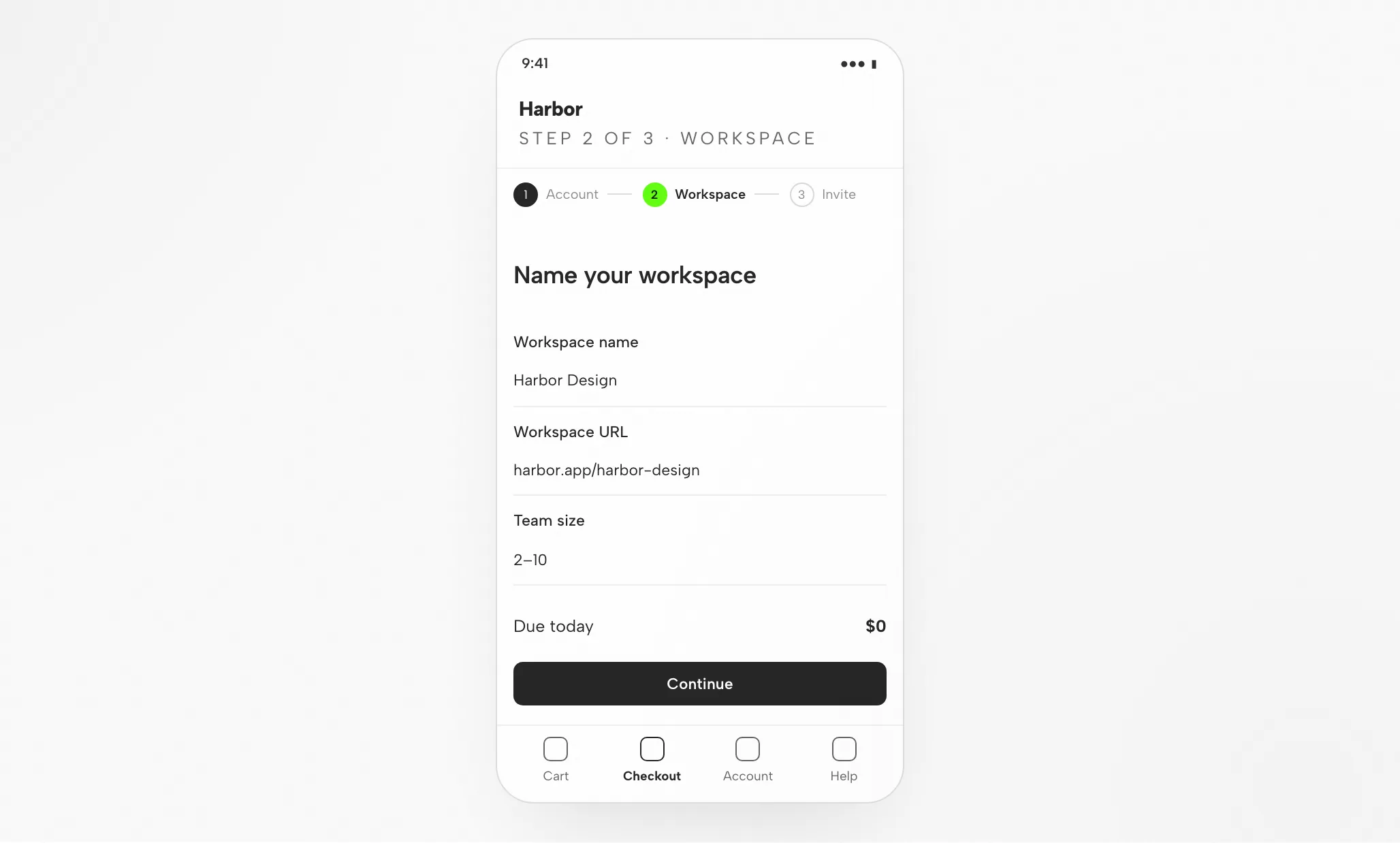
Stepper, form, and summary align to the 8px grid; the summary never exceeds the form’s height.
Order reads current step, then question, then fields; only the current step carries the accent.
On mobile the stepper compresses to dots with the current label; the summary collapses to one total line.
Test going back a step, triggering a validation error, and skipping the invite step.
Fit
Compatibility
This page covers Antigravity connected through the OpenDesign desktop app. References checked on 6 September 2026.
Antigravity is Google's agent-first development platform: an AI-powered IDE in which autonomous agents operate across the editor, terminal, and an integrated browser. It arrived in public preview alongside Gemini 3. The focus here is designing interfaces with Antigravity through OpenDesign, not Antigravity’s own interface. OpenDesign’s setup notes name the available agents.
public preview. Authenticate with your Google account — credentials stay on your machine. This page does not promise a quota or price.
For desktop builds, consult the download page. The Node.js and pnpm requirements in the source quickstart matter when running from source, not when installing a desktop package. Minimum compatible Antigravity version: not verified here.
Use the connection instructions your installed version displays, then try a small task. Confirm Antigravity handled it and the artifact opens. Downloading by itself does not prove a working connection.
Start with the desktop app
Begin with the download, finish the Antigravity setup for your installed version, then test a small result. Following this path does not require building OpenDesign from source.
Select the package for your machine, install it, and launch the app.
Download OpenDesignUse the Antigravity instructions that ship with your installed version. Sign in with your Google account — credentials remain on your machine.
# 1. Download Antigravity for your OS (macOS, Windows, Linux)
#    from the official download page: antigravity.google/download

# 2. Launch it and sign in
agy               # opens Antigravity; sign in with your Google account

# 3. Accept the data-use policy, pick a theme, and open your project folder
Taken from the Antigravity setup notes in the published guide; verify the current command in the vendor documentation.
Keep the initial brief modest so you can judge the full loop, including one revision.
Build a settings screen with a profile form and a save confirmation. Apply my design rules. Verify it at desktop and mobile widths.
If you want to run OpenDesign from source, use the technical quickstart instead.
The Antigravity design workflow
One signup-flow job traced from the first brief to a checked HTML artifact. At each stage: your input, Antigravity's move, OpenDesign's part, and the check you still own.
Three to six plain sentences. Identify who the screen serves, what it must accomplish and which platforms matter.
A design system plus a short list of non-negotiables. That is the line between brand-specific work and a default look.
Antigravity produces one self-contained HTML file — layout, styles, interactions and stable hooks included.
OpenDesign renders the file at the widths you specified. This is the point where the design is actually judged.
data-od-id targets so comments and edits can attach.Point at preview elements to request changes. Each revision arrives as a new file, so nothing is overwritten without a trace.
Resources
Tutorials, documentation and walkthroughs for Antigravity design work, as itemized in the published guide.
Artifact types Antigravity can generate inside OpenDesign, with one skill for each type.
Brand tokens and components to bind before Antigravity starts generating.
Launch points for decks, landing pages and product screens.
Limitations
FAQ
# 1. Download Antigravity for your OS (macOS, Windows, Linux)
#    from the official download page: antigravity.google/download

# 2. Launch it and sign in
agy               # opens Antigravity; sign in with your Google account

# 3. Accept the data-use policy, pick a theme, and open your project folder

# 4. Start an agent task in the Editor View or the Manager Surface,
# selecting a Gemini 3.x model (e.g. Gemini 3.1 Pro)# In an Antigravity agent task, attach reference-desktop.png and
# reference-mobile.png, then prompt:
Implement this design in React + Vite + Tailwind + TypeScript.
Reuse my existing design-system components and tokens.
Match spacing, layout, and hierarchy; make it responsive.
Render it in the integrated browser and iterate until it matches
the references across breakpoints, and show me the screenshots.